
Understanding PL Tones, Offsets, and IDs
SEO Title: Understanding PL Tones, Offsets, and Repeater IDs | DETARC
Meta Description: Confused by PL tones, repeater offsets, or Morse code IDs? Learn what they are, why repeaters use them, and how to program your radio with confidence.
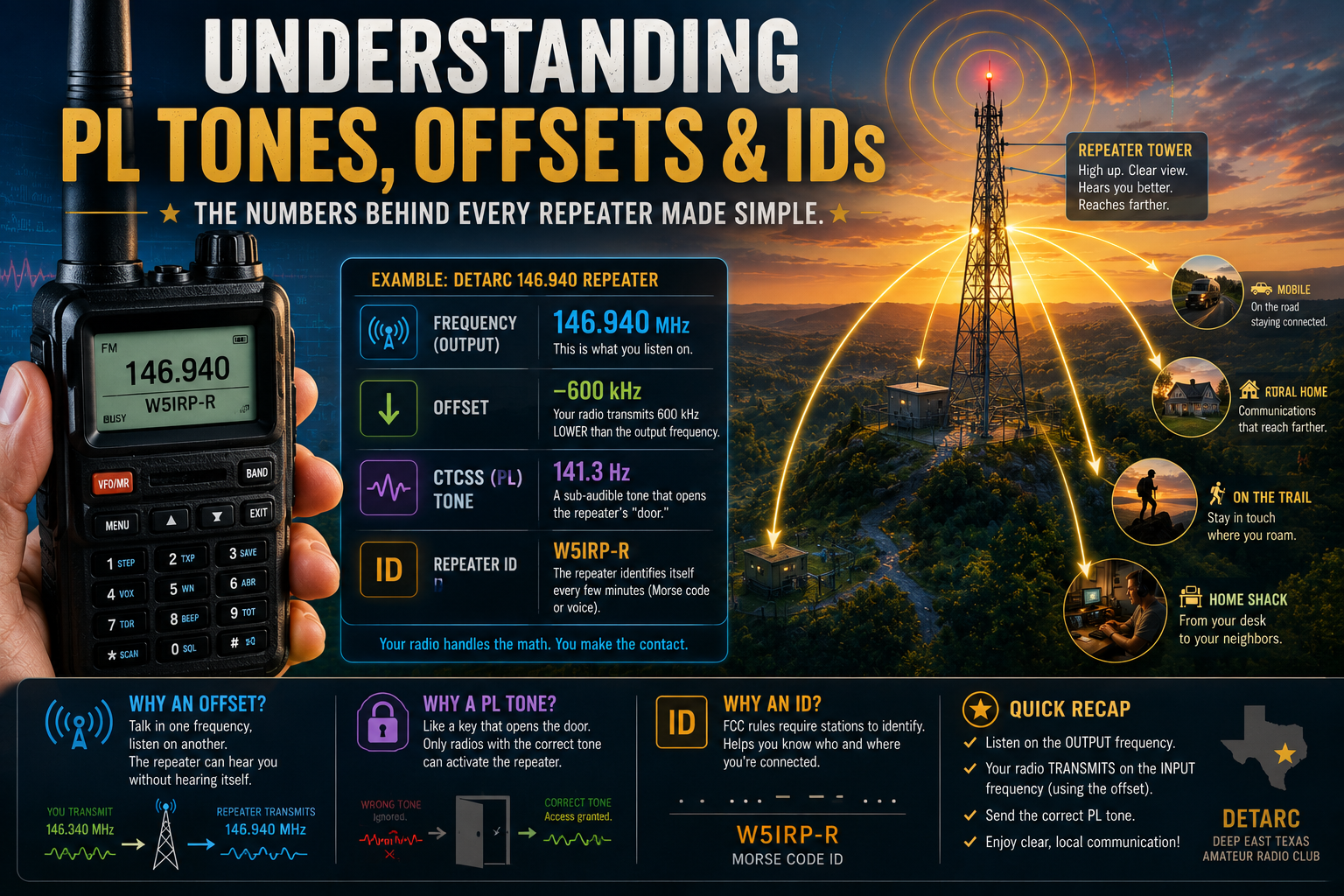
146.940 (-) 141.3
If you’ve looked at a repeater directory or club website, you’ve probably seen something like that and wondered:
“What does any of this actually mean?”
You’re not alone.
Every new amateur radio operator eventually encounters a string of numbers that looks more like a combination lock than a radio frequency.
Fortunately, none of it is as complicated as it first appears.
Once you understand three simple concepts—frequency, offset, and PL tone—you’ll be able to program almost any repeater you encounter.
Let’s decode the mystery.
Every Repeater Has Two Frequencies
When you look at the DETARC primary repeater, you’ll see:
146.940 MHz (-)
Most people assume that’s the only frequency involved.
It isn’t.
Every repeater actually operates on two frequencies:
- One frequency it transmits on.
- One frequency it listens on.
Think of a dispatcher wearing two radios.
One ear listens.
The other radio talks.
The dispatcher can hear one conversation while simultaneously repeating it to everyone else.
That’s exactly what a repeater does.
What Is an Offset?
The offset tells your radio how far away the repeater’s listening frequency is from its transmitting frequency.
For the DETARC primary repeater:
Output: 146.940 MHz
Offset: -600 kHz
That means the repeater listens on:
146.340 MHz
Fortunately…
You almost never have to calculate this yourself.
Modern radios do it automatically.
When you press the Push-To-Talk button:
Your radio quietly shifts down to 146.340 MHz.
The repeater hears you.
The instant you release PTT, your radio jumps back to 146.940 MHz so you can listen.
You never even notice it happening.
Why Use Two Frequencies?
Imagine standing in a room with a powerful loudspeaker.
Now imagine trying to listen while the loudspeaker is blasting your own voice directly into your ears.
You couldn’t.
The repeater has the same problem.
If it transmitted and received on exactly the same frequency, it would hear itself continuously.
Using separate frequencies allows it to:
- Listen on one.
- Talk on another.
At the exact same time.
Positive vs Negative Offsets
Depending on the repeater, the listening frequency may be:
Higher than the output frequency.
or
Lower than the output frequency.
That’s why repeaters are listed with:
146.940 (-)
or
147.360 (+)
The symbol simply tells your radio which direction to shift when transmitting.
Think of it like an elevator.
“+” means go up.
“-” means go down.
Your radio handles the rest.
What Is a PL Tone?
Now let’s look at the other mysterious number.
141.3 Hz
This is called a PL tone.
(PL originally stood for Private Line, Motorola’s trade name. You’ll also hear the more generic term CTCSS.)
Despite the name…
It doesn’t make your conversation private.
Anyone listening on the repeater frequency can still hear you.
The tone simply acts like a key.
Imagine an Apartment Building
Suppose you live in a large apartment complex.
You don’t want the front door opening every time someone rattles their keys.
Instead…
Only the correct key unlocks the door.
A PL tone works exactly the same way.
Your radio quietly sends a low-frequency tone underneath your voice.
The repeater listens for that specific tone.
If it hears the correct one…
It opens.
If not…
It ignores the transmission.
Can You Hear the Tone?
No.
At least, not normally.
PL tones are below the range of ordinary speech.
They’re transmitted continuously while you’re talking.
The repeater hears them.
You don’t.
Encode vs Decode
Some repeaters list:
Encode
Others list:
Encode & Decode
What’s the difference?
Encode
Your radio sends the correct PL tone.
That’s enough to activate the repeater.
This is the most common setting.
Decode
Your radio will only open its speaker if it hears the correct tone coming back from the repeater.
Some people like this because it blocks interference from nearby repeaters on the same frequency.
Others prefer leaving decode off so they hear everything.
Either approach is fine.
Programming the DETARC Repeaters
Let’s use the club’s primary repeater as an example.
| Setting | Value |
|---|---|
| Frequency | 146.940 MHz |
| Offset | -600 kHz |
| Tone | 141.3 Hz |
| Tone Mode | Encode (or Encode/Decode if desired) |
Once entered, your radio handles everything automatically.
What Happens If the PL Tone Is Wrong?
Usually…
Nothing.
You press PTT.
Your radio transmits.
The repeater never responds.
Many beginners assume:
“My radio is broken.”
It probably isn’t.
The wrong PL tone is one of the most common programming mistakes.
What Is a Repeater ID?
Every few minutes you may hear something like:
di-di-dah dit…
or perhaps a computerized voice.
That’s the repeater identifying itself.
FCC rules require amateur stations—including repeaters—to identify with their callsign.
The DETARC primary repeater identifies as:
W5IRP-R
Some repeaters use Morse code.
Others use synthesized voice.
Both are perfectly acceptable.
Do I Need to Know Morse Code?
No.
Not at all.
Recognizing that the repeater is identifying itself is useful.
Understanding every dot and dash is optional.
Many operators eventually become curious enough to learn a little Morse simply because they hear repeater IDs so often.
The Three Numbers You’ll See Most
After a while, repeater listings become almost second nature.
For example:
146.940 (-) 141.3
Immediately tells an experienced operator:
- Output frequency
- Offset direction
- PL tone
Everything else is handled automatically by the radio.
Did You Know?
Many modern radios can download repeater information directly from software like CHIRP, RT Systems, or manufacturer programming applications.
Instead of entering every number by hand, you can often import an entire repeater list in just a few minutes.
It’s one more reason programming today’s radios is much easier than it used to be.
Common Beginner Mistakes
Forgetting the Offset
You’ll hear everyone…
But nobody hears you.
Wrong PL Tone
Probably the single most common programming error.
Always double-check the tone.
Wrong Tone Direction
Some radios separate:
- Tone Encode
- Tone Decode
Make sure you’ve configured the correct one for your repeater.
Entering the Input Frequency
Unless you’re programming manually for simplex or special purposes, always start with the repeater’s published output frequency.
Let the radio handle the offset.
Don’t Be Afraid of the Numbers
At first glance:
146.940 (-) 141.3
looks intimidating.
By now, you know it simply means:
- Listen on 146.940 MHz.
- Transmit 600 kHz lower.
- Send a 141.3 Hz tone while talking.
That’s it.
Once you’ve programmed a few repeaters, you’ll hardly think about offsets or PL tones again.
They’ll simply become another part of getting on the air.
What’s Next?
Your radio is programmed.
You understand repeaters.
You know what the numbers mean.
Now it’s time for the fun part.
➡ Making Your First Contact
You’ll learn exactly what to say, when to key the microphone, and why your first QSO is probably much easier than you’re imagining.

One Comment