
Digital Voice DMR, Fusion, and D-STAR
Excerpt: DMR, Yaesu System Fusion, and D-STAR can connect your VHF/UHF radio with operators around town or around the world. Learn how the three major amateur-radio digital voice systems work, how they differ, and which one might make sense for you.
The Short Version
DMR, Yaesu System Fusion, and D-STAR all transmit your voice digitally instead of using conventional analog FM, but they are not compatible with one another.
Each has its own terminology, radios, repeater infrastructure, and network architecture:
- DMR uses talkgroups and is built around a commercial radio standard adapted extensively by amateur operators.
- System Fusion is Yaesu’s amateur-radio digital system and commonly uses Wires-X rooms for Internet-linked communication.
- D-STAR was developed specifically for amateur radio and commonly uses reflectors to link stations and repeaters.
There isn’t a universally “best” system. The best first choice is usually the one actually being used by hams and repeaters around you.
And yes, amateur radio managed to develop three incompatible ways of accomplishing roughly the same thing. We are nothing if not consistent.
First: What Is Digital Voice?
With ordinary analog FM, your voice directly modulates the radio signal. With digital voice, your radio first converts your speech into digital information using a voice codec.
Conceptually:
Your voice → digital data → radio signal → repeater/radio → digital data → voice
The receiving radio reconstructs your voice from that data.
Digital voice can provide features that ordinary analog FM doesn’t easily provide, including station identification, group calling, text/data functions, GPS information, and Internet-linked networks.
One important difference is how weak signals sound.
An analog FM signal usually becomes progressively noisier:
Clear → some static → lots of static → unreadable
Digital tends to remain intelligible longer and then deteriorate rapidly:
Clear → clear → robotic/gargled → gone
You’ll sometimes hear operators call this falling off the digital cliff.
Repeaters, Networks, and Hotspots
Before comparing the three systems, understand that digital radio and Internet linking aren’t the same thing.
You can make a digital RF contact directly between two radios:
Radio → Radio
Or through a local digital repeater:
Radio → Repeater → Radio
But many digital repeaters are also connected to Internet-based networks:
Your radio → RF → local repeater → Internet → distant repeater → RF → another operator
That’s how someone in Lufkin can potentially use a handheld to talk with an operator hundreds or thousands of miles away.
There are also personal hotspots.
A hotspot is a small, low-power digital radio interface—often based on hardware such as an MMDVM—that connects your handheld to a digital network using your home Internet connection or phone hotspot.
That looks more like:
Handheld → short-range RF → hotspot → Internet → digital network
A hotspot can be extremely useful, but remember what it is: an Internet gateway for your radio, not a repeater providing wide-area RF coverage.
With that foundation, the differences between the three systems make much more sense.
DMR — Digital Mobile Radio
DMR originally came from the commercial and professional land-mobile-radio world rather than being designed specifically for amateur radio.
Hams adopted it because the equipment became plentiful, relatively inexpensive, and extremely capable.
The Big Idea: Talkgroups
The concept you’ll encounter constantly in DMR is the talkgroup.
Think of a talkgroup as a logical conversation channel.
Examples might include:
- a worldwide talkgroup
- a United States talkgroup
- a Texas talkgroup
- a regional talkgroup
- a local club talkgroup
Your radio may physically transmit to the same repeater frequency regardless, but the talkgroup tells the network where you want your conversation routed.
A DMR contact might therefore look like:
Your radio → local DMR repeater → Texas talkgroup → DMR network → other repeaters/hotspots → operators
Two major amateur DMR networks you will encounter are BrandMeister and TGIF.
Your DMR ID
DMR also normally uses a numerical identifier associated with your callsign.
For example, your radio transmits your DMR ID along with the digital voice stream. Other radios can use that ID to display information about who’s transmitting.
You’ll therefore commonly hear new DMR operators told to obtain a DMR ID before getting started.
Time Slots
Here’s where DMR gets clever.
A DMR repeater can support two simultaneous conversations on one repeater frequency pair through TDMA—Time Division Multiple Access.
These are called:
Time Slot 1
Time Slot 2
The radios rapidly alternate tiny slices of transmission time.
To humans, both conversations appear simultaneous.
That allows one DMR repeater to effectively provide two digital voice paths using the same RF channel.
Color Codes
DMR also uses something called a Color Code.
Despite the name, nothing colorful happens.
It serves roughly the same purpose that a CTCSS/PL tone does on an analog repeater: it helps your radio identify the intended DMR system.
You’ll encounter values from Color Code 0 through 15.
So programming a DMR repeater may require knowing:
Frequency + offset + color code + time slot + talkgroup
This is why DMR programming can initially feel more complicated than analog FM.
Codeplugs
DMR radios commonly store their configuration in a codeplug.
A codeplug can contain:
- channels
- repeaters
- talkgroups
- contact lists
- zones
- scan lists
- time slots
- color codes
- radio IDs
Once properly configured, DMR is straightforward to operate.
Creating that first codeplug, however, is a rite of passage involving software, USB cables, spreadsheets, Internet searches, and occasional questioning of one’s life choices.
Ask another DMR operator for help. Seriously.
DMR may appeal to you if:
You like inexpensive hardware, lots of configuration options, large networks, talkgroups, experimentation, or commercial-style radio systems.
Yaesu System Fusion
Yaesu System Fusion was designed specifically for amateur radio and is closely integrated with Yaesu radios and repeaters.
You’ll often see its digital mode identified as C4FM.
Compared with DMR, Fusion was designed to make switching between conventional FM and digital operation relatively painless.
Automatic Mode Select
One of Fusion’s distinctive features is Automatic Mode Select (AMS).
A compatible Yaesu repeater can recognize whether an incoming transmission is analog FM or digital C4FM.
Depending upon how the repeater is configured, this can allow the same repeater system to accommodate both analog and digital users.
That’s particularly useful for clubs transitioning into digital voice without immediately abandoning analog FM.
Wires-X
Yaesu’s Internet-linking system is called Wires-X.
With a Wires-X-connected repeater, you can connect to network destinations called rooms.
Think of a room as a meeting place.
For example:
Your Fusion radio → local Fusion repeater → Wires-X → room → other connected repeaters/nodes
Operators connected to that room can hear and communicate with one another.
This is conceptually similar to a DMR talkgroup, although the underlying technology is different.
Digital Modes
Fusion radios may provide several digital operating modes depending upon the particular radio.
You’ll commonly encounter DN (Digital Narrow) and sometimes VW (Voice Wide).
DN balances digital voice with data capability, while VW devotes more bandwidth to voice.
You don’t need to master those distinctions on day one. Start with the settings used by your local repeater.
Why Fusion Often Feels Easier
Fusion radios generally require less elaborate programming than DMR.
You usually don’t have the same combination of:
talkgroup + time slot + color code + channel
to worry about.
If your local club operates a Fusion/Wires-X repeater, getting started can therefore be relatively straightforward.
Fusion may appeal to you if:
You already own or prefer Yaesu equipment, your local repeaters support Fusion, or you want a relatively approachable transition between analog FM and digital voice.
D-STAR — Digital Smart Technologies for Amateur Radio
D-STAR differs from DMR in an important way: it was designed specifically for amateur radio.
The system was developed through the Japan Amateur Radio League, and Icom became its most prominent equipment manufacturer. Kenwood has also produced D-STAR equipment.
Callsigns Are Central
Where DMR relies heavily on numerical IDs, D-STAR was built around amateur-radio callsigns.
You’ll encounter fields such as:
MYCALL — your callsign
URCALL — destination/instruction
RPT1 — local repeater
RPT2 — gateway routing
That can look intimidating when you first see it, but modern D-STAR radios automate much of this configuration.
Reflectors
Internet-linked D-STAR conversations often happen through reflectors.
A reflector is essentially a network meeting place.
Multiple D-STAR repeaters and users can connect to the same reflector:
Your radio → D-STAR repeater → Internet → reflector → other repeaters/users
You’ll encounter reflector families with names such as:
REF
XRF
DCS
XLX
You don’t need to understand all of those initially. Learn whichever system your local D-STAR operators actually use.
D-STAR Data
D-STAR isn’t limited to voice.
The standard also incorporates digital data capabilities, and some radios support features such as GPS position reporting, short messages, and data communication alongside digital voice.
That makes D-STAR particularly interesting to operators who enjoy experimenting with the intersection of radio and data networking.
D-STAR may appeal to you if:
You like Icom equipment, your area has D-STAR infrastructure, or you’re interested in a digital system designed specifically around amateur-radio callsigns and data capabilities.
So What’s the Difference?
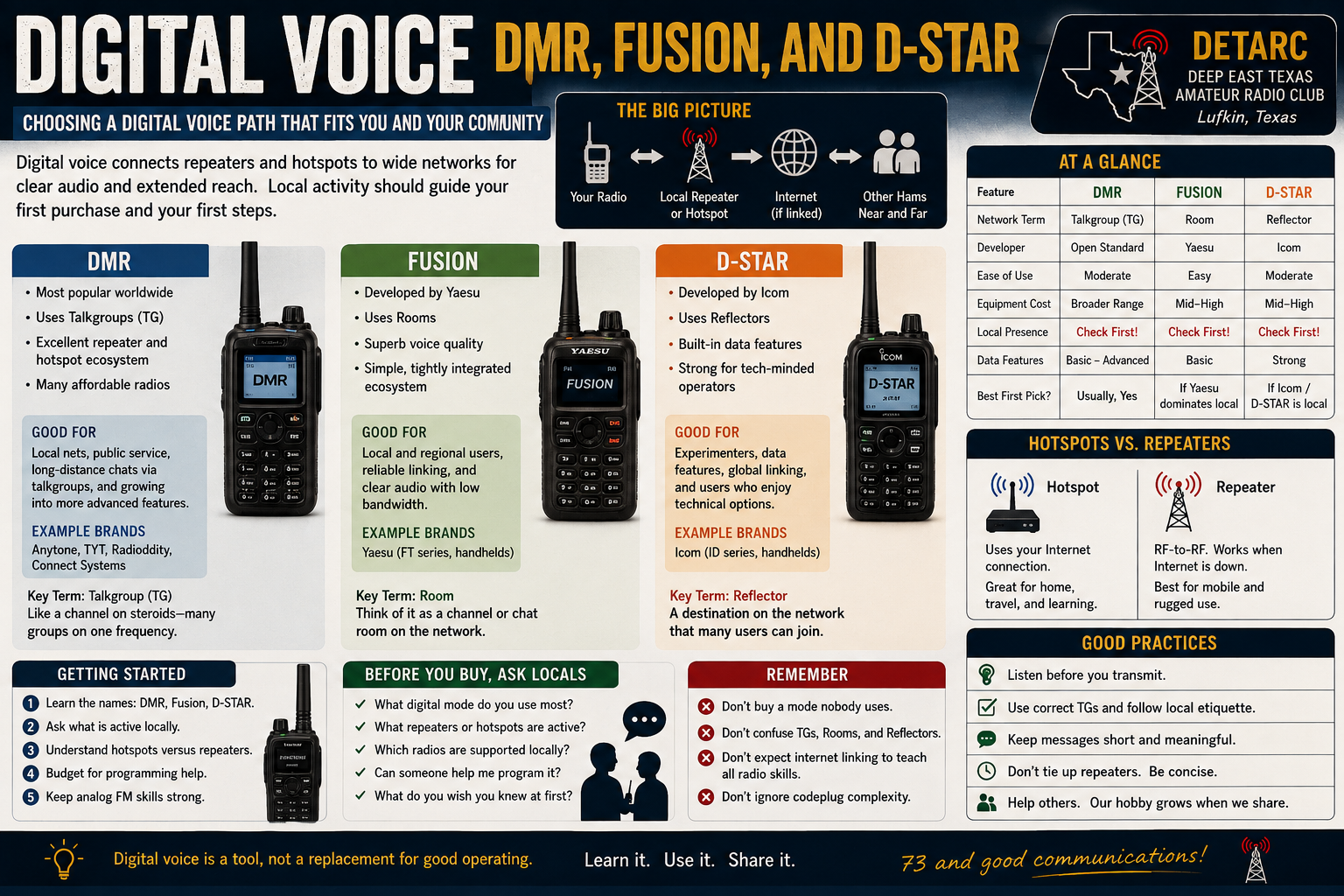
For a beginner, this simplified comparison gets you surprisingly far:
| DMR | Fusion | D-STAR | |
|---|---|---|---|
| Common term | Talkgroup | Room | Reflector |
| Origin | Commercial radio | Amateur radio | Amateur radio |
| Major manufacturer ecosystem | Many | Yaesu | Icom / some Kenwood |
| Internet linking | Yes | Wires-X | Yes |
| Personal hotspots | Yes | Yes* | Yes |
| Programming difficulty | Usually highest | Usually lowest | Moderate |
| Special ID | DMR ID | Callsign | Callsign |
| Two repeater time slots | Yes | No | No |
| Analog compatibility in same radio | Usually | Yes | Yes |
*Hotspot implementations may use compatible network technologies rather than being identical to a Yaesu Wires-X node.
Don’t choose based solely on that chart, though.
The most important row isn’t listed:
What are people around you actually using?
How to Choose Your First Digital Mode
Before spending money, find out what’s active around Lufkin and Deep East Texas.
Ask local operators:
Which digital repeaters can I actually reach?
Are people actively using them?
Which mode do DETARC members use most often?
Can someone help me program my radio?
Are people primarily using repeaters or personal hotspots?
That’s much more useful than asking the Internet which digital mode is “best.”
If twenty local operators use Fusion and nobody uses DMR, the technically superior DMR radio someone recommends on YouTube isn’t necessarily the superior radio for you.
What About a Hotspot?
A personal hotspot can give you access to digital networks even when you don’t have a compatible repeater nearby.
Typical hotspots contain a small digital radio board connected to a computer such as a Raspberry Pi or embedded Linux device.
Your handheld communicates with it using very low-power RF.
The hotspot then communicates with the network through the Internet.
That makes hotspots wonderful for:
Home → hotspot → Internet → worldwide digital network
They’re also useful while traveling when connected through a phone hotspot.
But don’t confuse this with independent radio infrastructure.
If your Internet connection disappears, so does the hotspot’s connection to the worldwide network.
A local RF repeater can continue providing local radio coverage without the Internet even if its network-linking functions disappear.
That distinction becomes important when discussing emergency communications.
Keep Your Analog FM Skills
Digital voice is fun, capable, and worth exploring.
It doesn’t replace analog FM.
A new Technician should still know how to:
- program a repeater frequency
- set an offset
- configure a PL/CTCSS tone
- listen before transmitting
- identify correctly
- make a simplex contact
- participate in a conventional repeater net
Those skills transfer almost everywhere.
Knowing how to select TG 3148 on TS2 with CC1 is considerably less useful when somebody hands you an analog radio at a public-service event and asks you to switch to 146.520 MHz.
Learn both.
Your First-Week Challenge
Don’t buy anything yet.
Find the digital repeaters within range of your home and determine whether they use:
DMR, Fusion, or D-STAR. (DETARC is predominantly DMR)
Then ask at least three local operators which systems they actually use and why.
If several people give you different answers, congratulations: you’ve just experienced amateur radio.
Come Learn With DETARC
Amateur radio is easier when you do not have to learn alone. DETARC exists to help operators in Lufkin, Angelina County, and Deep East Texas grow in skill, confidence, and service.
- Weekly net: Tuesdays at 8:00 PM
- Primary repeater: 146.940 MHz, PL 141.3
- Club meeting: 4th Thursday at 6:30 PM, Fuller Springs VFD
Bring your callsign, your questions, and your radio if you have one. New operators are welcome here.
Choose Your Next Adventure
- Back to the landing page: You Passed Your Technician Exam. Now Choose Your First Amateur Radio Adventure.
- Current adventure: Adventure 3 — I Like Computers
- Next suggested article: Raspberry Pi Projects for Hams
Frequently Asked Questions
Do I need expensive equipment to begin?
Usually, no. Start with the equipment that fits the activity and ask local operators before making a major purchase. The best first station is often the one you understand and will actually use.
What if I make a mistake?
You probably will, and that is normal. Keep it courteous, identify with your callsign, correct what you can, and learn from it. Every experienced operator was new once.
Is this something DETARC can help with?
Yes. DETARC is a local club, which means you can learn from people who know the repeaters, terrain, common radios, useful antennas, and real operating conditions around Deep East Texas.

There is a DMR repeater locally. TG9 is the local channel.
There are several Hot Spots out there. A few do multiple digital systems, while the majority keep to one system.